 Notes from Previous Releases
Release 2.10
- Speedups and lower memory usage
-
Further facets of See5/C5.0 have been parallelised and
some inefficiencies when reading multi-million-record datasets have been
rectified. The improvements
are most noticeable with larger applications, especially rule-based and
boosted classifiers.
- Better treatment of rare classes
-
Classes that have very low representation in the training data are
a problem for all data mining systems. See5/C5.0's heuristics have
been improved so that it now finds some patterns that were
overlooked in previous releases.
- Bug fixes
-
Earlier releases sometimes experienced problems on applications
with 10M+ records and very numerous classes. These were caused by
integer overflows that could lead to crashes or empty rulesets.
For boosted classifiers where boosting was terminated early, the error analysis and confusion matrix for the training data could be incorrect. The results for test data, and the classifiers themselves, were not affected.
Release 2.09
- Faster fuzzy thresholds
-
By default, See5/C5.0's thresholding of continuous attributes is
`sharp' -- a value is either above the threshold or it is not.
The option to use
soft or fuzzy thresholds
previously could involve
quite a lot of additional processing time, but the relevant mechanisms
have now been multi-threaded.
In this release, fuzzy thresholds are found with only a slight additional computational cost, and this option is highly recommended for applications with important continuous attributes.
- Small changes to trees and rulesets
-
The trees and rulesets constructed by Release 2.09 can vary
slightly from those produced by the previous release. This is because
ties are resolved differently, for example when two classes have
equal representation at a leaf.
These small changes can be amplified with
boosting.
- Bug fixes
-
Several minor bugs have been corrected:
-
For Windows, See5 did not always use up to the maximum of eight
processors when available. This fault did not affect the console
version See5X.
-
Attribute usage statistics could be reported incorrectly for
large applications with more than 2M cases.
- Soft thresholds are not useful when rulesets are generated. They are now automatically disabled if the rulesets option is used.
-
For Windows, See5 did not always use up to the maximum of eight
processors when available. This fault did not affect the console
version See5X.
Release 2.08
- Differential misclassification costs
-
See5/C5.0's handling of
misclassification costs
has been revised, particularly when the application
has more than two classes. Decision trees are pruned more carefully,
and the confidence of predictions is now calculated differently.
- Faster rulesets
-
Rulesets are now generated more quickly, especially for large applications.
For example,
the time to generate a ruleset for one dataset with 750,000 cases
was reduced by more than 10%.
- Bug fix: pruning
- A minor bug that could affect pruning of decision trees has been corrected. The problem could arise in applications with many attributes and a large number of missing values. (This bug only trivially affected the output of See5/C5.0 and had no noticeable impact on the trees' predictive accuracy.)
Release 2.07
- 64-bit Windows support
-
This release includes 64-bit versions of See5 and See5X (the batch
executable). These versions allow the use of more than 2GB of
memory, as required by some extremely large data mining tasks.
The 32-bit release of See5 will run under either 32-bit or 64-bit Windows, so there is no need to change unless your tasks may use more than 2GB of memory. The 64-bit version of See5 will run only under 64-bit Windows 8/10/11.
The network version of See5 includes both 32-bit and 64-bit versions for installation on client PCs. A client PC running 64-bit Windows 8/10/11 can install and use the 64-bit version, even if the server runs 32-bit Windows.
Linux C5.0 continues to be available in both 32-bit and 64-bit versions.
- Enhanced multi-threading
-
Additional sections of See5/C5.0 have been multi-threaded.
This can result in speed improvements when the application has many
discrete attributes, especially with the discrete value subset option.
- Confidence of ruleset predictions
-
Calculation of the confidence of a ruleset prediction has been altered
so that it more accurately reflects the ruleset's performance on
unseen data. Previous releases often showed low confidence for
ruleset predictions even when those predictions were quite accurate.
This affects the output from the public code to read and interpret See5/C5.0 ruleset classifiers, and also impacts results with boosted rulesets.
- Small changes to pruning algorithms
-
The pruning algorithms have been altered slightly to correct a
potential problem. For most applications this should not affect
the final classifier; in some cases, the tree or ruleset
will be larger or smaller, but predictive accuracy should be similar.
- Bug fix (June 2010)
- A bug in the ruleset interpreter was fixed. This bug could cause See5/C5.0 to crash, or to give incomplete results with the cross-reference facility.
Release 2.06
- New algorithm for softening thresholds
-
See5/C5.0 decision trees have an option to soften threshold tests for
continuous attributes; values near the threshold cause both
the low and high branches to be evaluated and combined probabilistically.
The methods for finding the bounds within which this combination is invoked have been re-designed to make them both faster and more effective. This option can lead to noticeably better predictive performance and is now recommended for applications with many continuous attributes.
- Improved boosting
-
The boosting option generates several classifiers that are then voted
to give a final prediction. This option, which is commonly used to
increase classification accuracy, has been updated to give better
results, especially on applications that use differential misclassification
costs.
- Selecting tests
-
Recent releases used a subset of the training data to eliminate
some possible tests from consideration. This could (very rarely)
lead to different classifiers when the training data were reordered,
or when See5/C5.0 was run on computers with multiple CPUs.
The use of data subsets has been discontinued in Release 2.06,
at a cost of a small increase in
the time required for applications with many continuous attributes
and hundreds of thousands of training cases.
- Faster classification with rulesets
-
The process for finding all the rules that are satisfied by a case
has been enhanced.
- Discontinuation of Solaris support
-
Solaris on SPARC architectures will no longer be supported.
Any Solaris licensees who might be inconvenienced by this change should
contact us to discuss possible remedies, such as moving their licences
to different computers.
- Bug fix: attribute winnowing
-
The attribute winnowing option attempts to identify unhelpful attributes
and exclude them from classifiers. A bug that could allow some or
all of these attributes to be retained was corrected on 12 January 2009.
If you downloaded Release 2.06 between 22 December 2008 and 12 January
2009, we recommend that you re-install the corrected release.
Release 2.05
- Attribute usage for rules
-
A summary showing the relevance of attributes to classifying
cases was introduced in Release 2.04. The definition of "usage"
for rulesets has been changed in this release so that the information
is more consistent across ruleset and tree classifiers.
In Release 2.04, an attribute was considered to have been "used" if its value was required to determine which rules applied to a case. This definition proved unsatisfactory because it depended on the order in which rule conditions were checked, and also because many attributes ended up having usage figures around 100%. In Release 2.05, an attribute is "used" to classify a case when it referenced by one or more conditions of an applicable rule (i.e., a rule whose conditions are all satisfied by a case). Usage figures for trees and rulesets are now more similar.
- Bug fix: case weight attributes and cost files
-
A bug in Release 2.04 could cause problems for
applications with two classes that used both a case weight attribute
and a .costs file.
- Bug fix (Windows only): interactive interpreter
- Previous releases could sometimes give incorrect results for boosted classifiers.
Release 2.04
- Attribute usage
-
A new summary highlights the usage of attributes that appear
in a classifier. This shows, for each attribute, the percentage
of training cases for which the value of that attribute is both known
and also used in classifying the case.
- False positive/false negative breakdown
-
See5/C5.0 currently shows a confusion matrix only when the number of
classes does not exceed twenty. If there are more than twenty
classes, when a confusion matrix would be too large,
Release 2.04 records the number of false positives and false
negatives for each class.
- Enhanced multi-threading
-
Release 2.04 will now use up to four processors and so
will run faster on the new quad-core CPUs and computers with
two dual-core processors.
- Linux GUI
- For Linux uses who have installed a recent version of Wine, the new release includes an optional GUI with many features of the See5 user interface. (The cross-reference facility in particular provides information that is not available from the command-line version.) The Linux GUI calls the native Linux C5.0, so there is no performance penalty.
Release 2.03
- Weighting individual cases
-
The training cases for some applications have different relative importance.
In a customer retention application, for example, the importance
of a case describing a customer might depend on the size of
the customer's account.
Release 2.03 introduces an optional case weight attribute with numeric
values; the effect is to bias the development of a classifier to increase
accuracy on more important cases.
- Smaller trees for applications with multi-valued discrete attributes
-
The algorithms for discrete attributes have been further improved.
One noticeable consequence is that decision trees tend to
be both smaller and more accurate when there are discrete attributes
with many values.
- Better use of cost information
-
While the treatment of costs for two-class problems remains much
the same, the handling of cost information for applications with
three or more classes has been extensively revised.
Muti-class applications that specify a costs file should now observe
lower average misclassification costs for unseen cases, especially
when rulesets are generated.
- Other changes and bug fixes
-
There have been minor modifications to the way soft thresholds
for decision trees are found.
Two small bugs in the Windows GUI have been rectified. These concern the display of implicitly-defined discrete attributes when the value is unknown, and the possible change of classifier settings when the "Cross-reference" or "Making predictions" windows are invoked immediately after a cross-validation.
Release 2.02
- Faster rule utility ordering
-
This option could be quite slow when large numbers of rules are
involved. The new release requires very little time to carry
out the ordering and analysis.
- More efficient memory use for high-dimensional applications
-
Memory allocation has been improved for applications with thousands of
attributes.
- Bug fix: rulesets and global pruning
-
This bug affected only ruleset classifiers generated with global pruning
disabled -- the resulting rulesets might have been over-simplified.
- Adaptation to Microsoft bug-fix (network versions only)
- To improve security, Microsoft Windows updates have disabled a feature that is used by clients to read on-line help, as documented here. The client installation program has been modified to set appropriate registry entries on the client, and also leaves a local copy of the help (See5Help.chm) in the See5 folder as a workaround in case new Windows updates affect HTMLHelp.
Release 2.01
- Multi-threading
-
The core of See5/C5.0 has been rewritten so that it can take
advantage of computers with dual processors or
Intel PCs with Hyper-Threading Technology.
This can noticeably reduce the time taken to process
very large datasets.
- 64-bit Linux version
-
C5.0 is now available in a 64-bit Linux version for
AMD PCs with Athlon64 and Opteron CPUs, and Intel PCs with
Extended Memory 64 Technology.
- Winnowing improved
-
Winnowing (pre-filtering the attributes) is now faster and somewhat
more conservative. Furthermore, the remaining attributes that will be
used to build classifiers are now ranked by importance, with an
estimate of how predictive accuracy or misclassification cost would
increase if individual attributes were removed.
- Bug fix
-
In previous releases, use of the cross-reference facility in
the See5 could cause problems when there
were errors in the
casesfile. These errors are now reported via pop-up messages. - New distribution format for Windows
- See5 Release 2.01 is distributed as a self-contained Inno executable.
Release 1.20/1.20a
The changes in Release 1.20 were as follows:
- Differential misclassification costs with rulesets, boosting
-
Right from the very first release, See5/C5.0 has allowed variable
costs to be associated with different types of classification error
as described here.
The use of costs with rulesets or boosted classifiers, however,
can sometimes produce quite high error rates. Release 1.20 has been
modified so that classifiers of these kinds often have lower
error rates without a noticeable increase in misclassification
costs.
- New class type: thresholded continuous attribute
-
This convenience feature now allows classes to be defined as
subranges of a continuous attribute. For instance, if
attribute
pricehas numeric values, the class specifierprice: 100, 1000, 5000.priceless than or equal to 100
pricegreater than 100 but less than or equal to 1000
pricegreater than 1000 but less than or equal to 5000
pricegreater than 5000. - Rule selection
-
The algorithm for refining an initial collection of rules has been
altered, with the result that Release 1.20 sometimes
produces smaller rulesets.
- Enhancement of public source code
- In response to several requests, the free source code for reading and interpreting classifiers has been extended. When (single or boosted) ruleset classifiers are used, a new option shows the rules that are applicable to each case.
- In the See5 GUI, the "Use Classifier" button for interactive interpretation would not work with ruleset classifiers.
- For thresholded class attributes (see below), a value of "?" for the continuous target attribute in a .cases file caused problems.
- There were also problems when the winnowing option was used at the same time as the minimum cases option was set to 1.
Release 1.19
- Rulesets require less memory
-
The memory required to generate rules from large datasets has
been significantly reduced. For example, Release 1.19 uses
143MB during processing of the
forest application, less than
half the 296MB needed by Release 1.18.
(This may sound as though 1.18 was rather wasteful with memory. The reduction is achieved, however, by compressing certain data structures as they are constructed; when information is required, relevant parts are temporarily restored.)
- Bug fixes
-
Two bugs have been fixed:
- a value of the "minimum cases" option greater than 25 could occasionally behave as if it was set to 25, and
- the highest possible threshold of a continuous attribute was sometimes overlooked.
- See5 on-line help rewritten
- The on-line help for the Windows version has been moved to the more modern HtmlHelp format and now corresponds closely to the tutorial available on the web.
Release 1.18
- Major improvements to rulesets
-
Release 1.18 complements the changes introduced in 1.17, where the
focus was on decision trees. In this release
the algorithms for generating rulesets have been substantially revised.
Speed is the most obvious improvement, but the rulesets themselves
are sometimes smaller.
For example, the following graphs compare the performance of 1.18 to the previous release (1.17) on three large datasets:
- Sleep stage scoring data (sleep, 105,908 cases,
obtained from
MLC++).
Every case in this monitoring application is described by 6 numeric-valued attributes and belongs to one of six classes. Rulesets are constructed from half the data and tested on the remaining 52,954 cases to estimate their true error rate. - Census income data (income, 199,523 cases,
obtained from
UCI KDD Archive).
The goal of this application is to predict whether a person's income is above or below $50,000 using 7 numeric and 33 discrete (nominal) attributes. The data are divided into a training set of 99,762 cases and a test set of 99,761. - Forest cover type data (forest, 581,012 cases,
also from
UCI KDD Archive).
This application has seven classes (possible types of forest cover), and the cases are described in terms of 12 numeric and two multi-valued discrete attributes. As before, half of the data -- 290,506 cases -- are used for training and the remainder for testing.
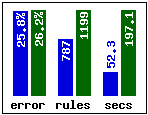
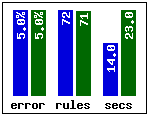
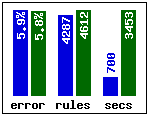
sleep income forest Results for 1.18 are shown in blue. Releases 1.17 and 1.18 generate rulesets with similar predictive accuracies, but notice how much faster 1.18 is -- on the largest dataset it is nearly five times as fast as 1.17.
- Sleep stage scoring data (sleep, 105,908 cases,
obtained from
MLC++).
- Bug fixes
-
Two bugs have been fixed that (sometimes) cause problems with
combinations of options:
- use of the discrete value subsetting option together with the rulesets option for applications with ordered discrete attributes; and
- use of the attribute winnowing option together with the sampling option and samples greater than 50% (Windows only).
Release 1.17
- Simpler trees
-
A further global decision tree pruning phase has been
incorporated in the new release.
This mechanism is intended to make classification models more compact
without impairing their predictive accuracy.
On the well-known census dataset, for example, Release 1.17 produces
a 159-leaf decision tree that is slightly
more accurate than the 211-leaf tree output by Release 1.16.
A new option allows global pruning to be disabled if desired.
- Improved scalability
-
For larger datasets, Release 1.17
uses internal sampling to evaluate alternative splitting tests.
This speeds up the generation of decision trees as the following
example shows:
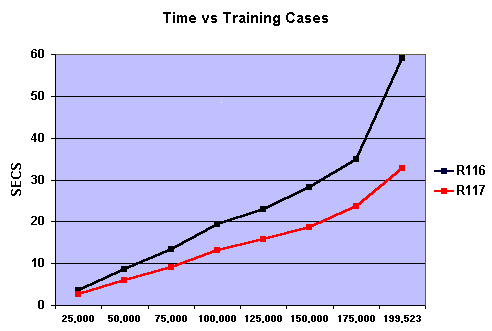
The graph compares the times required by 1.16 and 1.17 to construct a decision tree for different-sized subsets of a dataset. The releases perform similarly for 25,000 training cases, but 1.17's advantage increases with size -- at around 200,000 cases, 1.17 is almost twice as fast as 1.16.
Release 1.16
- Attribute winnowing
-
When the number of attributes is large (in the hundreds, say)
it becomes harder to distinguish predictive information
from chance coincidences. For example, a test that separates one
class from another in a small subset of the training cases might
be genuinely interesting; on the other hand, if hundreds of alternatives
have been tried, it is more likely that a similar separation can
be found even when none of the tests is helpful for prediction.
A new winnowing option helps to overcome this problem by investigating the usefulness of all attributes before any classifier is constructed. Attributes found to be irrelevant or harmful to predictive performance are disregarded ("winnowed") and only the remaining attributes are used to construct decision trees or rulesets.
- Changes to test selection
-
One of the fundamental processes in classifier construction
is deciding whether to incorporate another test and, if
so, which alternative test to pick. This decision is made
on the basis of heuristic estimates of usefulness and, although
a test can be removed later, the test itself is
hardly ever changed.
See5/C5.0 now uses a modified test selection strategy when the training data contains thousands of cases or more. The change is intended to reduce the number of unhelpful tests appearing in classifiers so that they are smaller and/or have higher predictive accuracy. Even without the winnowing option, the classifiers produced by Release 1.16 may differ from those generated by earlier releases.
Release 1.15
- Faster boosting
-
The proprietary variant of boosting
employed in See5/C5.0 has been modified considerably.
Boosting is now noticeably faster
and more resistant to noise in the data.
- Simplified output for rules
- When the "rules" option is selected, the output now omits information about decision trees.
Release 1.14
- New data type
-
Timestamps are read and written in the form
YYYY-MM-DD HH:MM:SSusing a 24-hour clock. (Recall that See5/C5.0 already has data types for times and for dates.) A timestamp is rounded to the nearest minute and implicitly defined attributes can be used to compute functions of timestamps such as the number of minutes between two of them. - Attributes excluded/included
-
The attributes that may be used in constructing a classifier
can now be specified in the
.namesfile. This can be either a list of the allowable attributes or, alternatively, a list of the attributes to be excluded. - Faster subsetting of discrete attributes
-
When the subsetting option is invoked, the values of discrete attributes
are collected into subsets. This is particularly useful when
discrete attributes have numerous values and is now much
faster than in previous releases.
- Improved boosting
-
Boosting is a technique originated by Yoav Freund and Rob Schapire
for building multiple classifiers to improve predictive accuracy.
See5/C5.0 uses a modified form of the original technique that has
now been further improved, especially for large datasets and rule-based
classifiers.
- Changes to results window (See5 only)
-
Viewing large results files should now be much faster;
some minor format changes will also be apparent. (For the
technically minded, the results window no longer uses the
Rich Edit control.)
Release 1.13
- New data type
-
Times are read and written in the form
HH:MM:SS. Implicitly defined attributes can be used to compute functions of times, such as the number of seconds between two times. - Better rulesets
-
Release 1.13 focuses on improvements to all aspects of rulesets.
- Rules are found more quickly (quite a lot more quickly in some applications).
- The process for selecting rules to form the final ruleset has been revised, with the result that rulesets are generally a bit smaller without loss of predictive accuracy.
- Finally, large rulesets can be interpreted more quickly -- an advantage when using the public C code to deploy applications.
Release 1.12
- New data values
-
A new value N/A can be used when the value of an attribute
is not applicable to a case. For example, consider the attributes
`purchased ticket?' with values `yes' and `no', and
`ticket cost' with numeric values. If a case's value of
the former is `no', the appropriate value for the latter
is now `N/A'.
Dates can now be entered as either
YYYY/MM/DDorYYYY-MM-DD. - Changes to .tree and .rules files
-
Up to Release 1.11 decision tree and ruleset models have been
stored as binary files. From this release they have been changed to
ASCII files, so that models generated on one machine type may be
deployed on machines of another type. The source code that
facilitates such deployment has also changed substantially.
To ease the changeover, See5/C5.0 and the new public code will still read model files (.tree and .rules) generated by Release 1.11.
- New Unix option
-
Cross-validation has now been incorporated directly into C5.0
rather than being available only through the
xvalscript. The-Xoption invokes cross-validation and specifies the number of folds.The
xvalscript is still used for multiple cross-validations. However, the option+dthat preserves detailed outputs now saves one file for each cross-validation rather than one file for each C5.0 run. - Improved error messages
-
Problems with application files (.names, .data, .test, .costs etc)
can be corrected more easily because the error message includes
the line number of the file in question.
- Minor tweak
- Boosting has been improved somewhat for large data files (more than four thousand records).
Release 1.11
- New data types
-
Dates are input and output in the form
YYYY/MM/DDand can be used with implicitly defined attributes to determine, for instance, the number of days between two dates or the day of the week on which a date falls.Ordered discrete values are nominal values that have a natural ordering, such as
small, medium, large, XL, XXL. When an attribute's discrete values are noted as ordered, See5/C5.0 exploits this information to test subranges of the values, e.g.[large-XXL]. This tends to produce more compact models with higher predictive accuracy. - Alternative ordering for rulesets
-
A new option allows rulesets to be ordered by utility, from
most important to least important for classification accuracy.
Furthermore, rules can be grouped into a number of bands,
so that it is possible to see how the most important X% of rules
perform on training and test data.
- New Unix options
-
Options are now provided to ignore any .costs files
and to set the random number seed (so that runs with sampling etc.
are repeatable).
- Improvements to the See5 GUI
-
The output window is now more readable, and can be copied and printed
directly (without having to switch to WordPad).
A new button on the toolbar allows the previous output to be redisplayed.
- Minor tweaks
-
Several algorithms used in See5/C5.0 have been tuned or otherwise improved.
Most of these changes will be invisible to the user,
but some (such as the method for
selecting subsets of discrete values) may cause classifiers to differ from
those produced by Release 1.10.
- Revision of source code
- The source code for reading and interpreting classifiers constructed by See5/C5.0 has been further revised. Warning: The new code will not work correctly with releases earlier than 1.10.
Release 1.10
- Attributes defined by formulas
-
It is sometimes convenient to define the value of an attribute
as a function of other attribute values rather than by giving
the value explicitly in .data files. Release 1.10 allows
such implicitly-defined attributes to be described by formulas in
the .names file. The formulas need not be simple -- both
numeric and logical values can be introduced in this way.
- Fuzzy thresholds
-
A test on a numeric attribute A in a decision tree
has two branches associated with it, one for each of
A < t and A > t for some threshold t.
When the value of A is near t, small changes in
the value can produce quite different classifications.
With fuzzy thresholds, both branches of the tree are explored if
the value of A is close to t;
the results are then
combined to give a classification that changes more slowly with
the value of A.
Previous releases of See5/C5.0 had a fuzzy thresholds option, but these soft thresholds were used only in interactive classification. The method for finding fuzzy thresholds has been changed in Release 1.10 and they are now used whenever a case is classified by a decision tree. (Note that fuzzy thresholds have no effect on rulesets.)
- Changes to the See5 GUI
-
There have been several improvements in line with suggestions
made by users (and please keep them coming!):
- A new Edit menu brings up the .names or .costs file in WordPad, making it easier to change these files.
- The classifier construction settings last used with an application are stored and are reset whenever that application is selected again. (There's also a new button on the dialog box to reset all of them to their default values.)
- A new button on the classifier construction dialog box allows any .costs file to be ignored.
- The main window can be clicked on top of the output window.
- Revision of source code
- The source code for reading and interpreting classifiers constructed by See5/C5.0 has been extensively revised. Warning: The new code will not work correctly with releases before 1.10, nor will Release 1.10 work with the old source code.
Release 1.09
- Confidence values for decision trees
-
When a case is classified by a decision tree, the calculation of
the classification confidence has been changed slightly.
The difference is particularly noticeable when the leaves involved
have very little supporting data. The changes have also been
reflected in the public source code for reading and using
classifiers.
- Faster boosting
-
Boosting is speedier for large datasets,
especially where the number of boosting trials exceeds 20
or so.
- Cross-validations with misclassification costs
-
For applications with a .costs file,
the Unix cross-validation script now reports average misclassification
costs. The results summary also incorporates costs directly.
- Many-valued discrete attributes
-
See5/C5.0's handling of discrete attributes with numerous values
is faster, and the subsetting option uses less memory.
- Public source code
- Output from the sample program is easier to read, and cases are identified by their label attribute (if this is defined).
Release 1.08
- New attribute type label
- In some applications, each case has an identifying code or
serial number; this information can be recorded in a label
attribute. A label attribute does not affect classification in
any way, but its value is displayed where possible with information about
the case such as error messages, cross-referencing results etc.
- Sample locking (See5)
- The sampling option introduced in Release 1.07 allows random
train/test splits of an application's data to be generated
automatically. In some situations,
for instance when investigating
alternative classifier construction options,
it is desirable to be able
to `lock in' a particular sample, and
an additional option on the classifier
construction dialog box is now provided for this purpose.
- Saving cross-referencing results (See5)
- See5's cross-referencing facility is a powerful tool for finding the cases covered by particular components of classifiers, and parts of classifiers relevant to particular cases. The information in the cross-referencing window at any point in time can now be saved as a text file.
Release 1.07
- Sampling option
- See5 and C5.0 now include an option to sample from large
datasets. This enables a fixed percentage of the cases in
a data file to be used for training. As an added
convenience, classifiers constructed using the sampling option
are now automatically evaluated on a disjoint set of test
cases.
- Batch-mode version of See5
- GUIs are great, but it's sometimes useful to be able to run See5 non-interactively from a MS-DOS command window. See5 Release 1.07 includes an additional program See5X that can be executed as a console application. Options for See5X are set by command-line parameters in exactly the same way as for the Unix version C5.0. (Not included with the free demonstration download.)
Release 1.06
- Cross-reference facility (See5)
- This has been extended to allow classifiers to be related
to cases in
.testand.casesfiles in addition to the.datafile. The cross-reference window itself now indicates whether cases are misclassified. - Speed improvements
- Both C5.0 and See5 are now faster, particularly for large datasets.
Release 1.05
- Rulesets
- The method for generating and selecting rules has been
`tweaked' slightly to improve performance on some datasets.
As a result, you may observe changes in the rulesets generated
from your data.
Rule numbering has also been changed: the numbers are now sequential,
rather than the previous higgledy-piggledy arrangement.
- Cross-reference facility (Windows version)
-
See5 now has a new button that looks like a large `X'.
This invokes a novel method of cross-referencing classifiers and the
data from which they were constructed. Click on a training case
to see the parts of the classifiers relevant to that case.
Conversely, click on a decision tree leaf or a rule to see
the cases that match that leaf or rule.
This facility can help to identify problems in the training data,
and can be very useful for understanding complex classifiers
(such as boosted trees or rulesets).
- Progress report file
- The Unix progress report file is now filestem.tmp, allowing two or more users to process copies of the same application in different directories. The dialog box in the Windows version has been changed to accommodate larger values of the minimum cases option.
Earlier Releases
- Names file
- The format of the names file has been extended to allow you
to select any discrete-valued attribute as the class.
The first line of the names file can now contain the name of another
attribute instead of the list of classes separated by commas.
(The list of classes is still OK, so you don't have to change
existing names files.)
- Boosting
- A modified method is used to predict when boosting is likely to
be harmful. Boosting is no longer disabled when this occurs, but a warning
message is still printed.
- Progress report (Unix version)
- C5.0 now updates the file /tmp/filestem
(where filestem is the application name) to indicate
the stage it is up to, and where it is in that stage. You might like
to inspect this file from time to time during long runs.
- Result window (Windows version)
- The system menu for this window has been extended with the option
Switch to WordPad. This option invokes the WordPad editor
on the output, allowing it to be printed, edited etc.
- Bug fixes
- Several relatively minor bugs have been fixed. The most serious bug
in the initial release concerned
the use of rulesets together with a costs file -- the system
could sometimes associate an incorrect class with a rule, leading to
abnormally high error rates.
- Rulesets
- Each rule now provides information on the number of cases that it covers, and the method of choosing a default class has been altered slightly.
| © RULEQUEST RESEARCH 2017 | Last updated March 2017 |
| home | products | licensing | download | contact us |